Lesson 6
Data loaders
Introduction
A Dataset defines how to load one data record. A DataLoader shuffles the records and groups them into batches. This lesson writes both classes and reads one batch at a time.
- Learning goal
Write a custom Dataset class, build a DataLoader, and explain shuffle, batch size, drop_last, and num_workers.
- Before you start
Python classes and loops, plus tensor shapes and integer data types from Lesson 1.
Lesson plan
- Compare the jobs of the Dataset and the DataLoader.
- Build a toy dataset, a custom Dataset class, and two DataLoader objects.
- Iterate over batches, then choose drop_last and num_workers.
Dataset and DataLoader
PyTorch has two classes for data preparation. A Dataset defines how to load one data record. A DataLoader handles the shuffle and makes batches.
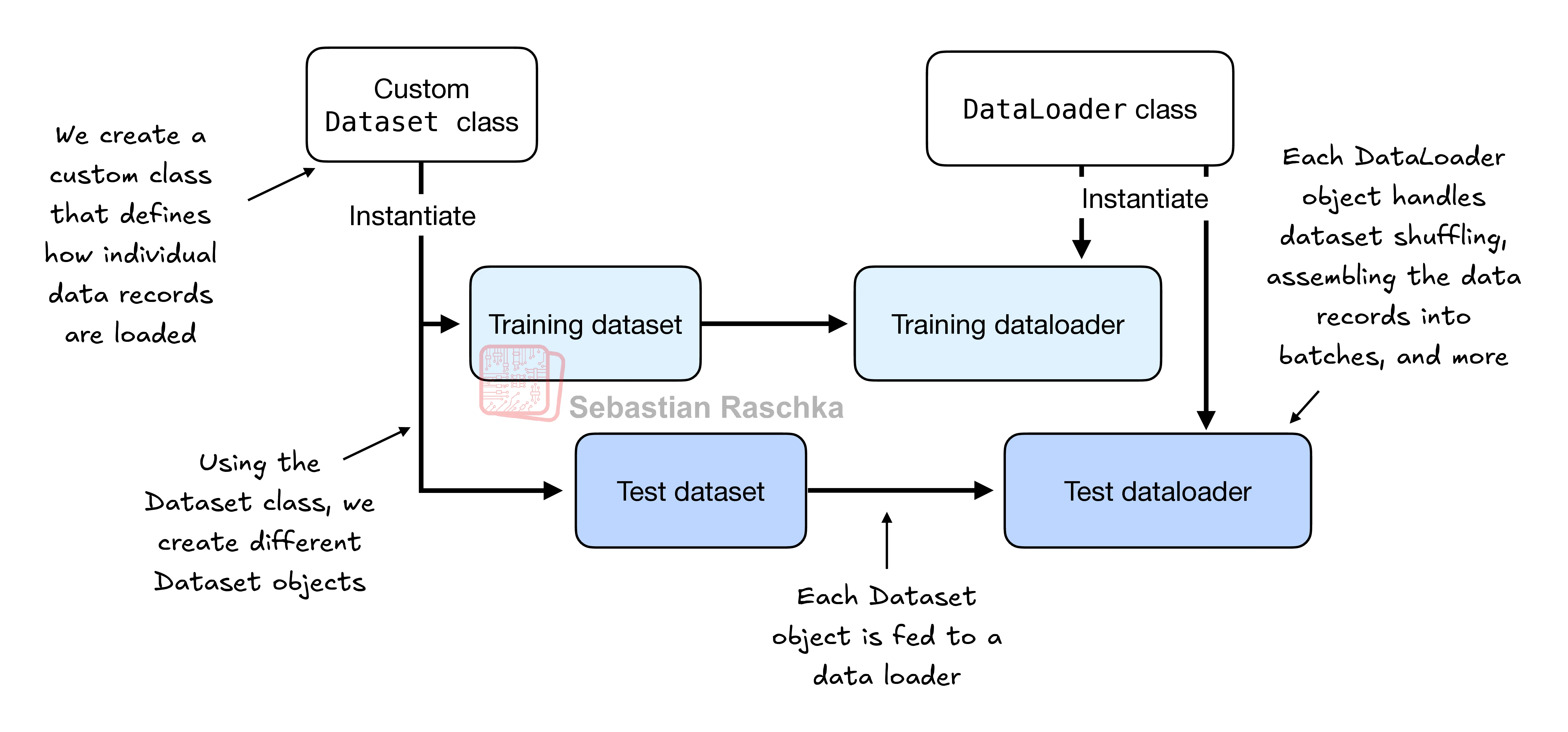
Keep the two jobs separate. The Dataset answers one question: what is record number i? The DataLoader answers a different question: which records go into the next batch, and in what order?
A class is a template for objects. The next sections write one Dataset class and two DataLoader objects.
The toy dataset
Make 5 training examples with 2 features each. Three examples are class 0, and two examples are class 1.
import torch

X_train = torch.tensor([
    [-1.2,  3.1],
    [-0.9,  2.9],
    [-0.5,  2.6],
    [ 2.3, -1.1],
    [ 2.7, -1.5]
])

y_train = torch.tensor([0, 0, 0, 1, 1])
Make a test set with 2 entries.
X_test = torch.tensor([
    [-0.8,  2.8],
    [ 2.6, -1.6],
])

y_test = torch.tensor([0, 1])
PyTorch needs class labels that start at 0. The largest label must not be larger than the number of output nodes minus 1. For example, labels 0, 1, 2, 3, and 4 need 5 output nodes. This rule follows Python index counting, which starts at 0.
A custom Dataset class
Subclass PyTorch's Dataset class. A subclass inherits the parent behavior, and then you add the needed methods.
from torch.utils.data import Dataset


class ToyDataset(Dataset):
    def __init__(self, X, y):
        self.features = X
        self.labels = y

    def __getitem__(self, index):
        one_x = self.features[index]
        one_y = self.labels[index]
        return one_x, one_y

    def __len__(self):
        return self.labels.shape[0]

train_ds = ToyDataset(X_train, y_train)
test_ds  = ToyDataset(X_test, y_test)
The class has three main parts. __init__ sets the attributes. The attributes can be file paths, file objects, or database connectors. This class stores the tensor objects.
__getitem__ returns one item for one index. The item holds the features and the class label of one example. The DataLoader gives this index.
__len__ returns the number of rows in the dataset. The training dataset has 5 rows, so len(train_ds) gives 5.
Building the DataLoader
Pass the dataset, a batch size, a shuffle choice, and a worker count.
from torch.utils.data import DataLoader

torch.manual_seed(123)

train_loader = DataLoader(
    dataset=train_ds,
    batch_size=2,
    shuffle=True,
    num_workers=0
)
test_loader = DataLoader(
dataset=test_ds,
batch_size=2,
shuffle=False,
num_workers=0
)shuffle=True mixes the record order before each epoch. The test loader keeps the order with shuffle=False.
Iterating over batches
A loop over a DataLoader gives one batch at a time.
for idx, (x, y) in enumerate(train_loader):
    print(f"Batch {idx+1}:", x, y)
Batch 1: tensor([[ 2.3000, -1.1000],
[-0.9000, 2.9000]]) tensor([1, 0])
Batch 2: tensor([[-1.2000, 3.1000],
[-0.5000, 2.6000]]) tensor([0, 0])
Batch 3: tensor([[ 2.7000, -1.5000]]) tensor([1])The loader visits each example one time. This complete pass is a training epoch.
The seed makes the shuffle order repeatable. The order changes on the second pass. This change prevents repeated update cycles during training.
The batch size is 2, but the third batch has 1 example. The number 5 is not divisible by 2. A small last batch can disturb convergence. Set drop_last=True to drop the last batch in each epoch.
train_loader = DataLoader(
    dataset=train_ds,
    batch_size=2,
    shuffle=True,
    num_workers=0,
    drop_last=True
)
Choosing num_workers
num_workers controls parallel data loading.
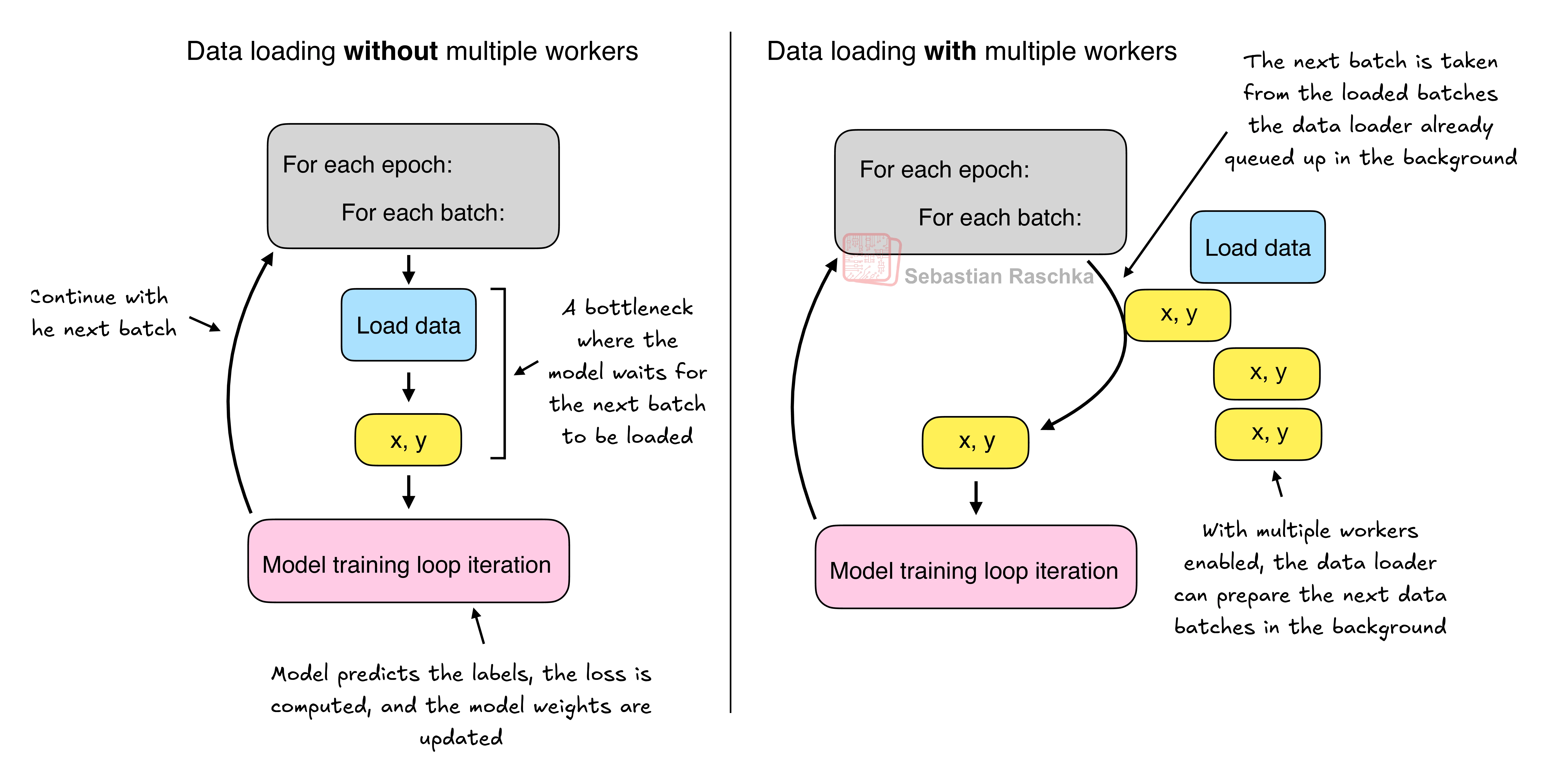
num_workers=0 means the main process loads the data. The CPU also loads and changes the data, so the GPU can wait for the CPU. This wait slows down training on large models.
num_workers greater than 0 means worker processes load the data in parallel. The main process trains the model. This setting uses the system resources better.
For a very small dataset, 1 worker or more is not necessary. The training time is a fraction of a second.
In a Jupyter notebook, num_workers greater than 0 can cause errors or crashes. The reason is resource sharing between processes. The start of the worker processes can also cost more time than the data loading.
Weigh the trade-off for your dataset and environment. In practice, num_workers=4 is a good start for many real datasets. The best setting depends on your hardware and your Dataset class.
Common pitfalls
- PyTorch class labels must start at 0. The largest label must not be larger than the number of output nodes minus 1.
- Keep feature tensors as floats and label tensors as
torch.long. A loss function expects the right data type for each role. - Do not use
drop_last=Trueon a test loader. It removes real examples from evaluation. - The shuffle order changes between epochs. Do not compare batch numbers across epochs as if the examples stay fixed.
- In a Jupyter notebook, start with
num_workers=0. Increase the number only after the code runs without errors. - Check
len(dataset)against the number of rows. A wrong__len__gives a wrong epoch length and a missing example.
Try it
Make a DataLoader for 6 examples with 2 features. Use batch_size=4 and drop_last=True. How many batches does one epoch have?
Reveal the worked answer
import torch
from torch.utils.data import Dataset, DataLoader

class ToyDataset(Dataset):
    def __init__(self, X, y):
        self.features = X
        self.labels = y

    def __getitem__(self, index):
        return self.features[index], self.labels[index]

    def __len__(self):
        return self.labels.shape[0]

X = torch.tensor([[0.0, 1.0],
                  [1.0, 0.0],
                  [0.0, 1.0],
                  [1.0, 0.0],
                  [0.0, 1.0],
                  [1.0, 0.0]])
y = torch.tensor([0, 1, 0, 1, 0, 1])

loader = DataLoader(ToyDataset(X, y), batch_size=4,
                    shuffle=False, drop_last=True)

print(len(loader))                 # Expected: 1
for x, batch_y in loader:
    print(tuple(x.shape), tuple(batch_y.shape))
    # Expected: (4, 2) (4,)
The dataset has 6 rows. A batch size of 4 gives one full batch and one short batch of 2 rows. drop_last=True drops the short batch. One epoch then has one batch.
Recap
A Dataset defines how to load one record, and a DataLoader groups records into batches. A custom Dataset class needs __init__, __getitem__, and __len__. The shuffle order can change each epoch, and one complete pass is one epoch. Use drop_last=True when a short final batch causes trouble. Start with num_workers=0, then raise the number for large datasets outside a notebook.
Reference: PyTorch data documentation.