Lesson 1
What is PyTorch
Introduction
PyTorch is an open-source deep learning library. It uses Python. This lesson shows the three core parts of PyTorch and how to install the correct version.
- Learning goal
Describe the three core parts of PyTorch, place deep learning inside AI and machine learning, and install the correct PyTorch version for your computer.
- Before you start
Basic Python and a terminal. No deep learning experience is necessary.
Lesson plan
- Read the three core parts of PyTorch: the tensor library, autograd, and the deep learning utilities.
- Place AI, machine learning, and deep learning in the correct relation.
- Install PyTorch and check the version and the GPU support.
What PyTorch is
PyTorch is an open-source library for deep learning. It uses Python. Research uses it more than any other deep learning library since 2019. The Kaggle survey of 2022 shows that about 40 percent of the respondents use it. The number grows each year.
PyTorch has a friendly interface. It is also fast. It does not sacrifice flexibility. Expert users can change low-level parts of a model. Many workers and researchers get the right balance of usability and features.
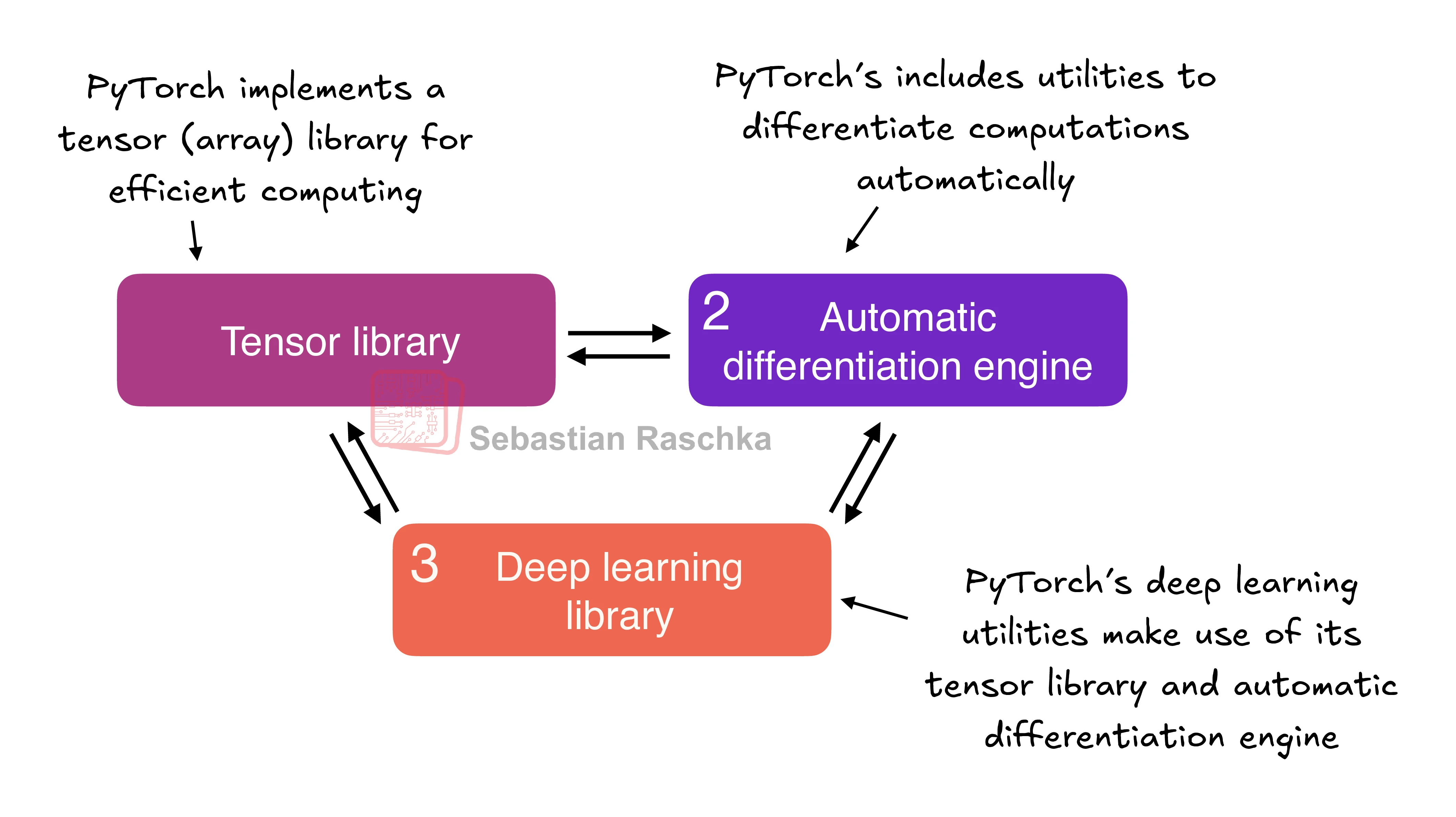
The three core components
PyTorch is a large library. Look at three broad parts.
Defining deep learning
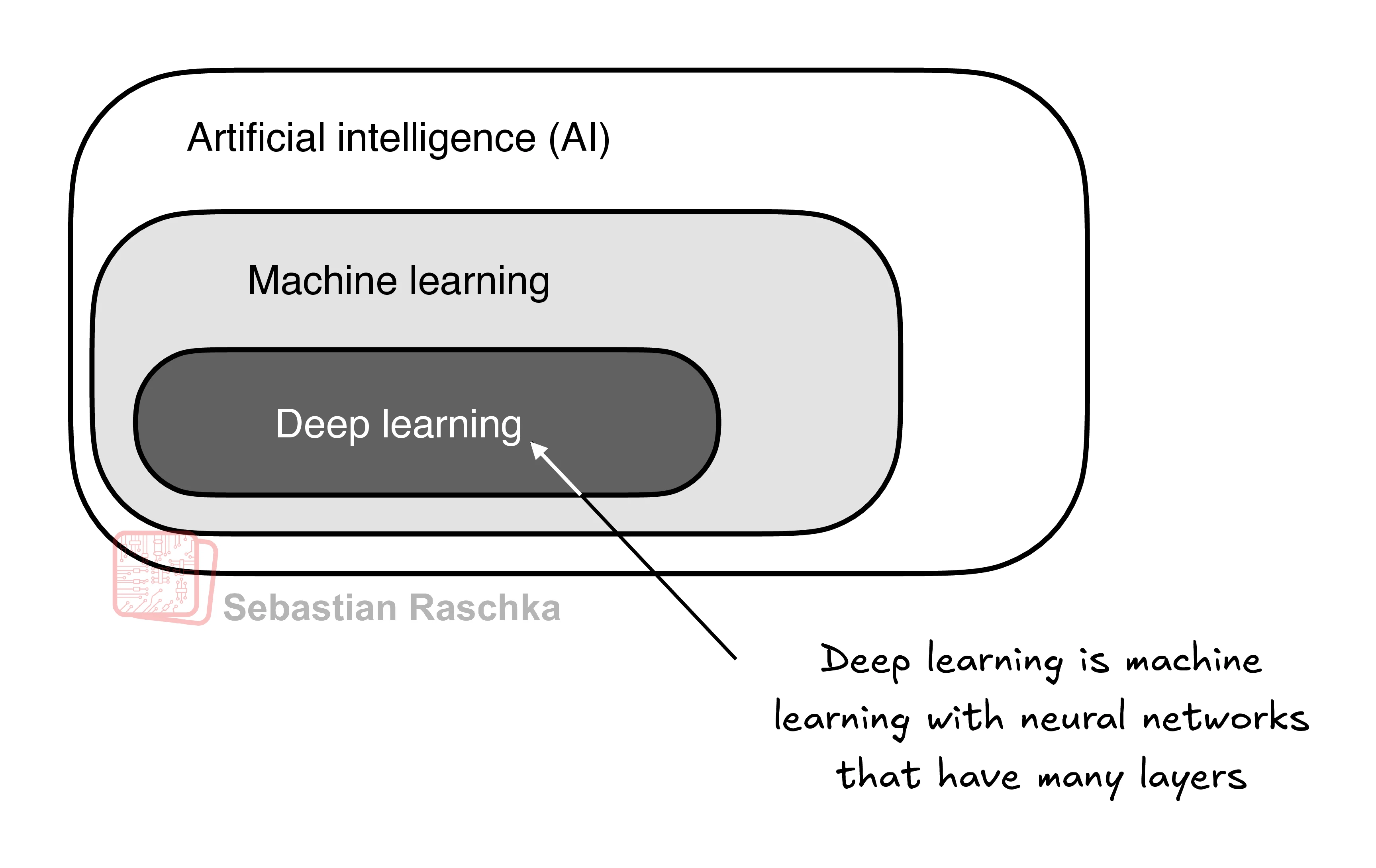
News reports call LLMs AI models. An LLM is also a deep neural network. PyTorch is a deep learning library. These terms have a relation.
| Term | Meaning |
|---|---|
| AI | Computer systems that do tasks which usually need human intelligence. The tasks include language understanding, pattern recognition, and decisions. AI is not yet at general intelligence. |
| Machine learning | A subfield of AI. It develops algorithms that learn. The algorithms find patterns in data. They improve with more data and feedback. |
| Deep learning | A subfield of machine learning. It trains deep neural networks. The networks have many hidden layers. The layers model complex, nonlinear relations in the data. |
Machine learning powers recommendation systems, spam filters, voice recognition, and self-driving cars. It moved AI past strict rule-based systems.
Deep learning is good with unstructured data, such as images, audio, and text. For this reason, deep learning fits LLMs.
The supervised learning workflow
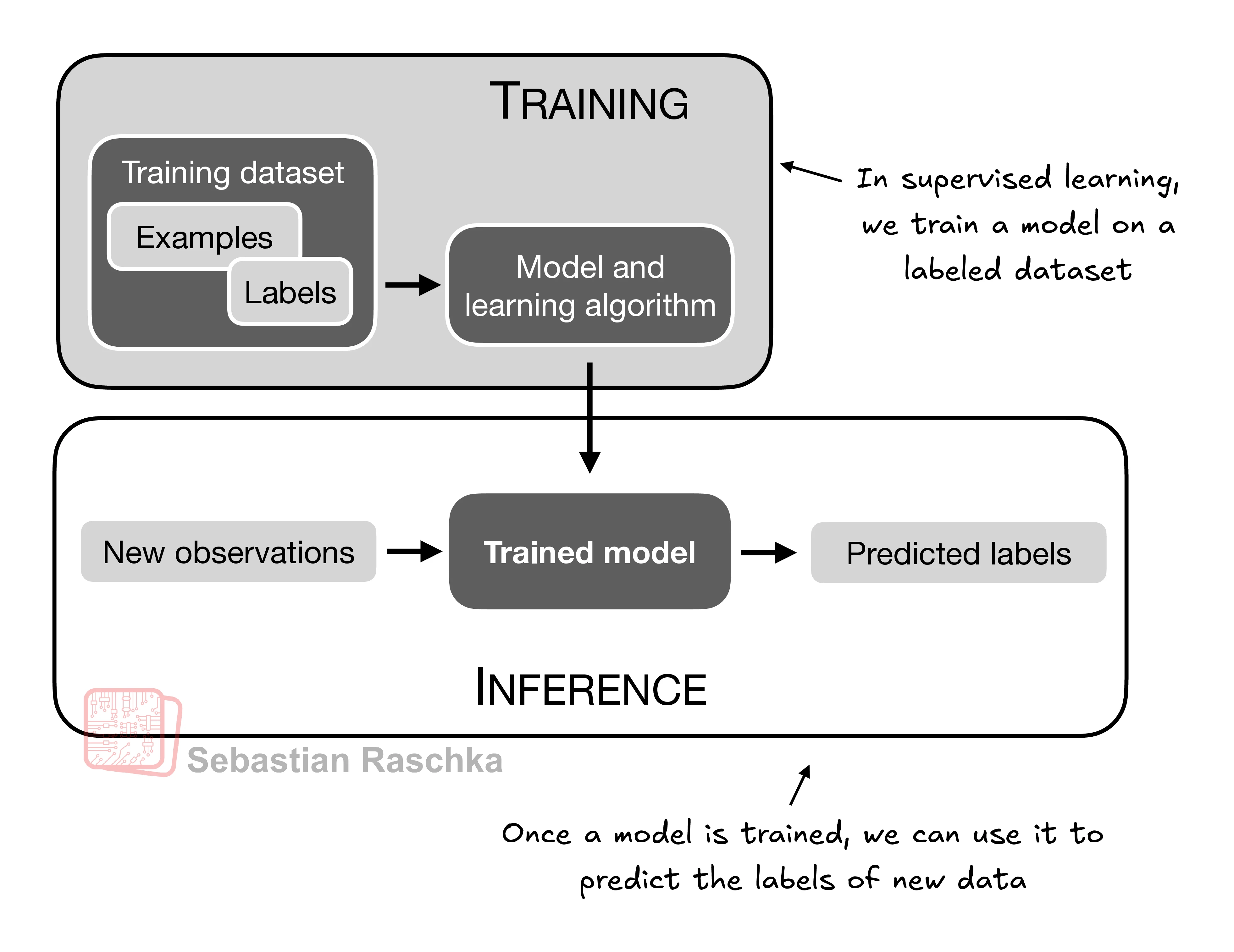
Supervised learning uses labeled examples. The workflow has three stages.
- Train the model on a training dataset. The dataset holds examples and labels.
- Evaluate the model. Check the model against your quality target.
- Use the model for inference. The model predicts the labels of new observations.
Example: an email spam classifier. The training data holds emails and their "spam" or "not spam" labels. A person marks the labels. Then the model predicts the label of a new email.
An LLM can use the same workflow. For text classification, train the model on labeled texts. For text generation, the labels come from the text itself. During pretraining, the model learns from the text. During inference, the model makes new text from a prompt.
Installing PyTorch
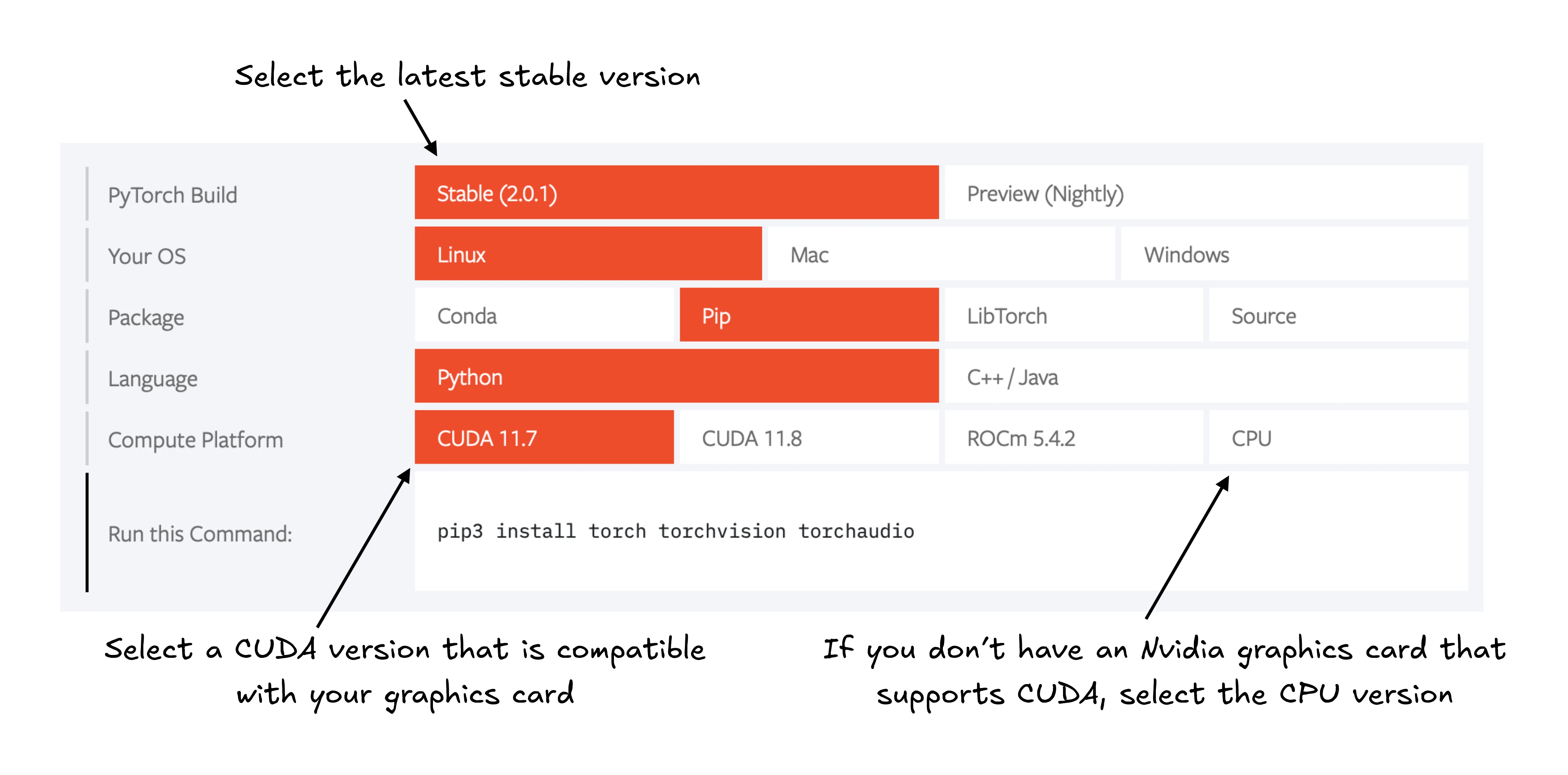
Install PyTorch like other Python packages. Use pip.
pip install torchPython version
Many scientific libraries do not support the newest Python at once. Use a Python version that is one or two releases older. Example: if the newest version is 3.13, use 3.11 or 3.12.
PyTorch has two versions:
- A small version with CPU compute only.
- A version with CPU and GPU compute.
If your computer has a CUDA GPU, install the GPU version. A good GPU is an NVIDIA T4, RTX 2080 Ti, or newer.
The default command installs the GPU version if the environment has the necessary dependencies. To be sure, name the CUDA version in the command.
AMD GPUs. PyTorch has experimental support through ROCm. See pytorch.org for the instructions.
This tutorial uses PyTorch 2.4.1. Use this command for the same version.
pip install torch==2.4.1The command can differ for your operating system. Visit pytorch.org and use the install menu. Replace torch with torch==2.4.1 in the command.
Check the version of PyTorch with this code.
import torch
torch.__version__     # Expected: '2.4.1'
The name "torch". The Python library is "torch" because it continues the Torch library. That library used the Lua language. The name "PyTorch" means Torch for Python.
Check for an NVIDIA GPU.
torch.cuda.is_available() # Expected: True or FalseTrue: the GPU is ready. False: your computer has no compatible GPU, or PyTorch does not find it. A GPU is not necessary to train a model. A GPU makes the computations much faster.
No GPU? Use a cloud provider. Google Colab gives you a GPU for a limited time. Select a GPU in the "Runtime" menu.
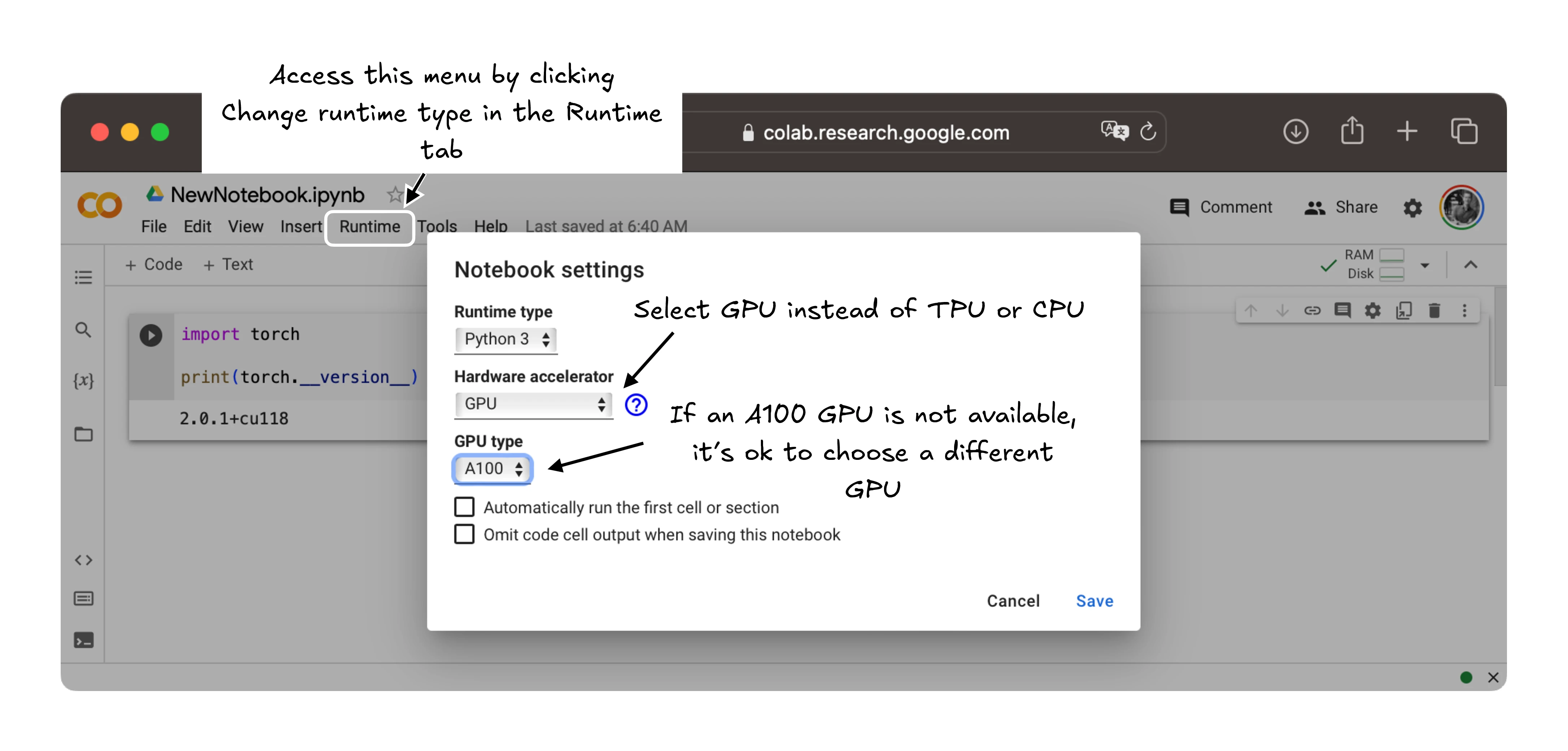
Apple Silicon. A Mac with an M1, M2, M3, M4, or newer chip can accelerate PyTorch. Install PyTorch in the usual way. Then run this check.
print(torch.backends.mps.is_available()) # Expected: True or FalseTrue means the chip can accelerate PyTorch code.
Common pitfalls
- Do not use a Python version that is newer than the scientific libraries support. Use a version one or two releases older.
- Do not assume that a GPU is present. Check the result of
torch.cuda.is_available(). - The default install command can install a CPU-only build. Name the CUDA version to be sure.
- The import name is
torch, notpytorch. Writeimport torch.
Try it
Install PyTorch in a fresh environment. Then print the version, the CUDA availability, and the MPS availability. Record each answer.
Reveal the worked answer
import torch

print(torch.__version__)
print(torch.cuda.is_available())
print(torch.backends.mps.is_available())

# Expected on a CPU-only machine:
# 2.4.1
# False
# False
The version string can differ if you install another version. False for CUDA and MPS means the computer has no compatible GPU, or PyTorch does not find it. The install is still correct.
Recap
PyTorch is an open-source deep learning library. It has three core parts: a tensor library, an automatic differentiation engine, and a deep learning library.
AI contains machine learning, and machine learning contains deep learning. Deep learning trains deep neural networks.
Install PyTorch with pip. Use a Python version that is one or two releases older. Check the version and the GPU support after the install.
Reference: PyTorch.