Lesson 2
Tensors, shapes, and data types
Introduction
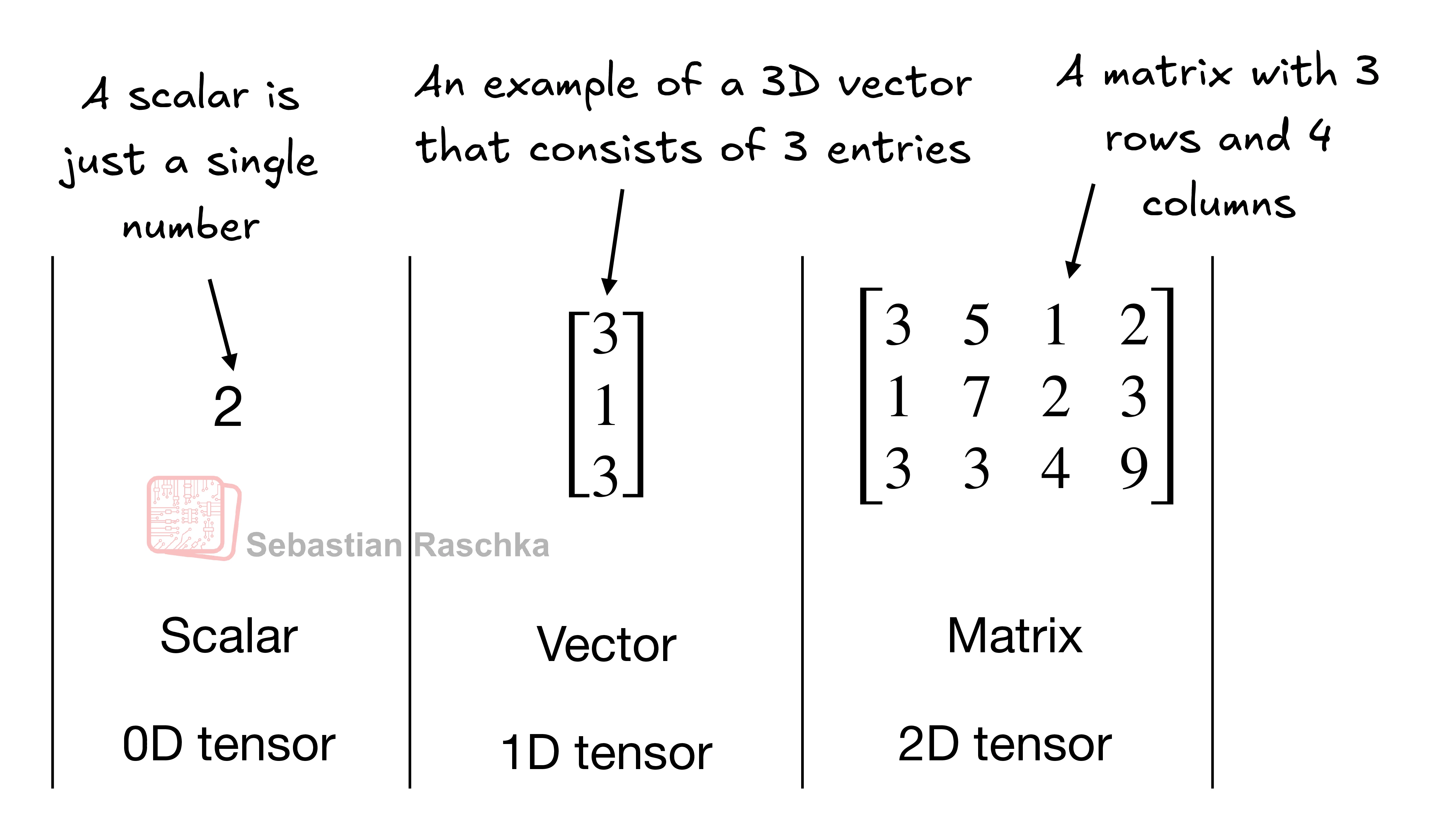
A tensor is a grid of numbers. Its rank gives the number of axes: a scalar has rank 0, a vector has rank 1, and a matrix has rank 2. The shape and the data type of a tensor decide which operations are valid.
- Learning goal
Create scalars, vectors, matrices, and higher-rank tensors. Read the shape and the data type. Reshape, transpose, and multiply two-dimensional tensors.
- Before you start
Python lists, nested lists, indexing, integer and decimal values, and basic matrix multiplication.
Lesson plan
- Read rank, shape, and data type for a tensor with one, two, or three axes.
- Create rank-0 to rank-3 tensors and select the correct data type.
- Reshape, transpose, and multiply two-dimensional tensors, then check each result.
This lesson starts from one number and builds up to a tensor with three axes. Every example runs on the CPU. You need only Python and the torch package.
What a tensor is
A tensor generalizes vectors and matrices to higher dimensions. A tensor has an order, also called rank. The rank is the number of dimensions.
().(3,) means three values.(2, 3) means two rows and three columns.A 3D vector with 3 elements is still rank 1. Higher ranks have no special name. We say "3D tensor", "4D tensor", and so on.
A tensor is a data container. Each dimension can represent a different feature. A tensor library creates, changes, and computes with these arrays. In this sense, a tensor library is an array library.
PyTorch tensors are like NumPy arrays. They add two features that matter for deep learning:
- An automatic differentiation engine. It computes gradients.
- GPU compute. It makes training faster.
PyTorch uses most of the NumPy array API and syntax.
Create a tensor
Use the torch.tensor function. It reads a Python number or a nested Python list. The nesting depth sets the rank.
import torch

# Rank 0: one Python number.
tensor0d = torch.tensor(1)

# Rank 1: a Python list.
tensor1d = torch.tensor([1, 2, 3])

# Rank 2: a nested Python list.
tensor2d = torch.tensor([[1, 2], [3, 4]])

# Rank 3: two matrices in one tensor.
tensor3d = torch.tensor([[[1, 2], [3, 4]],
                         [[5, 6], [7, 8]]])

print(tensor0d)                # tensor(1)
print(tuple(tensor0d.shape))   # ()
print(tensor1d)                # tensor([1, 2, 3])
print(tuple(tensor1d.shape))   # (3,)
print(tensor2d)
# tensor([[1, 2],
#         [3, 4]])
print(tuple(tensor2d.shape))   # (2, 2)
print(tuple(tensor3d.shape))   # (2, 2, 2)
The printout shows the rank rule. A Python number gives a scalar. A flat list gives a vector. A list of lists gives a matrix. Each extra list level adds one axis.
Tensor data types
PyTorch chooses a data type from the Python values. Python integers become 64-bit integers. Read the data type with the .dtype attribute.
import torch

tensor1d = torch.tensor([1, 2, 3])
print(tensor1d.dtype)     # torch.int64

floatvec = torch.tensor([1.0, 2.0, 3.0])
print(floatvec.dtype)     # torch.float32
Python floats become 32-bit floats. This choice is the default.
Why 32-bit: it gives enough precision for most deep learning tasks. It uses less memory and less compute than 64-bit. GPU hardware runs 32-bit operations fast. This choice makes training and inference faster.
Change the data type with the .to method.
floatvec = tensor1d.to(torch.float32)
print(floatvec.dtype)     # torch.float32
The full list of data types is in the PyTorch tensor documentation.
Common tensor operations
You do not need every operation. Learn the operations that appear in most projects. This table lists the common ones.
| Operation | Effect |
|---|---|
.shape | The size of each dimension. torch.Size([2, 3]) means 2 rows and 3 columns. |
.reshape(3, 2) | Change the shape into 3 by 2. |
.view(3, 2) | The common command for a reshape. |
.T | Transpose. Flip the tensor across its diagonal. |
.matmul(other) | Multiply two matrices. |
a @ b | The same matrix multiply, in a short form. |
Reshape and transpose
A reshape changes the shape and keeps the values. A transpose flips rows and columns. Both operations keep the number of values the same.
tensor2d = torch.tensor([[1, 2, 3],
                         [4, 5, 6]])

print(tensor2d.reshape(3, 2))
# tensor([[1, 2],
#         [3, 4],
#         [5, 6]])

print(tensor2d.view(3, 2))     # same result as reshape

print(tensor2d.T)
# tensor([[1, 4],
#         [2, 5],
#         [3, 6]])
Matrix multiplication
Matrix multiplication combines rows and columns. The inner sizes must match. The result of (2, 3) times (3, 2) has shape (2, 2).
print(tensor2d.matmul(tensor2d.T))
# tensor([[14, 32],
#         [32, 77]])

print(tensor2d @ tensor2d.T)   # same result as matmul
PyTorch first used the Lua Torch syntax. Later it added NumPy syntax. Both spellings stay for the same computation.
Try the operations at the prompt
Run each line on its own. The result prints below the line.
import torch

tensor2d = torch.tensor([[1, 2, 3],
                         [4, 5, 6]])
tensor2d
tensor2d.reshape(3, 2)
tensor2d.view(3, 2)
tensor2d.T
tensor2d.matmul(tensor2d.T)
tensor2d @ tensor2d.T
Common pitfalls
- Do not confuse a scalar of shape
()with a one-item vector of shape(1,). - Python integers become
torch.int64. Python floats becometorch.float32. An operation with both types can raise an error. - A reshape changes the view of the data, not its meaning. Keep track of what every axis represents.
- Use
reshapeafter a transpose.viewneeds contiguous memory and can fail. - Matrix multiplication needs matching inner sizes. Check the two shapes before the operation.
Try it
Create a rank-2 tensor with shape (2, 2). Print its shape and its transpose. Then multiply the tensor by its transpose. What shape does each result have?
Reveal the worked answer
import torch

a = torch.tensor([[1, 2],
                  [3, 4]])
print(tuple(a.shape))          # (2, 2)
print(a.T)
# tensor([[1, 3],
#         [2, 4]])
print(a @ a.T)
# tensor([[ 5, 11],
#         [11, 25]])
print(tuple((a @ a.T).shape))  # (2, 2)
The input has two rows and two columns. The transpose swaps the axes, so it also has shape (2, 2). The inner sizes are 2 and 2, so the product is valid and keeps shape (2, 2).
Recap
A tensor is a grid of numbers with a rank, a shape, and a data type. Rank 0 is a scalar, rank 1 is a vector, and rank 2 is a matrix. Use torch.tensor to create a tensor. The common operations are reshape, transpose, and matrix multiply.
Predict the output shape before a tensor operation. Then check one value by hand. In the next lesson, computation graphs record these operations and prepare the gradients for training.
Reference: PyTorch tensor documentation.